
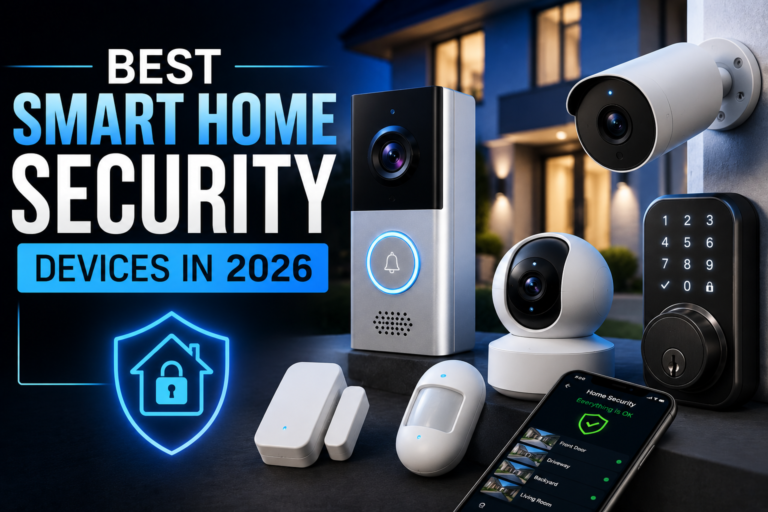
Protect your home with smarter cameras, video doorbells, smart locks, sensors, and security systems designed for modern households.
Home security has changed dramatically. A few years ago, protecting a house usually meant installing a traditional alarm, adding a few security cameras, and hoping someone noticed suspicious activity. In 2026, smart home security devices can do much more.
A modern security setup can tell you when someone approaches your front door, alert you when a window opens, let you lock your door remotely, detect movement, and send notifications directly to your phone. Some systems can even use AI-powered detection to distinguish between people, vehicles, animals, and ordinary movement.
That doesn’t mean you need to turn your home into a high-tech fortress.
In fact, the smartest approach is usually to combine a few carefully selected devices that cover the areas that matter most. A video doorbell can monitor the entrance, outdoor cameras can cover vulnerable areas, door and window sensors can detect unauthorized access, and a smart lock can give you greater control over who enters your home.
But with dozens of products competing for attention, choosing the right smart home security devices can be confusing.
This guide looks at the most useful categories to consider in 2026, what each device does, where it works best, and what you should check before buying.
1. Smart Video Doorbells
For many homes, the front door is the logical place to begin a smart security setup.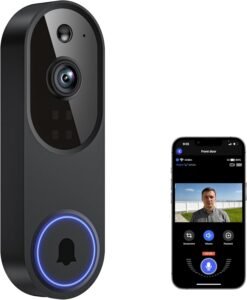
A smart video doorbell combines a traditional doorbell with a connected camera. Depending on the model, it can detect movement, record video, send smartphone notifications, provide two-way communication, and alert you when someone approaches the entrance.
The biggest advantage is awareness.
You don’t necessarily need to be standing near the door to know what’s happening. If a delivery arrives while you’re at work, for example, your phone can notify you. If someone rings the bell while you’re upstairs, you may be able to see and communicate with them without opening the door.
Some newer models also offer smarter detection features that can help differentiate people, vehicles, animals, and packages.
For homeowners, this makes a video doorbell one of the most practical smart security upgrades.
However, don’t buy based solely on camera resolution. Field of view, night vision, motion detection, local storage, cloud storage, battery life, Wi-Fi performance, and subscription requirements can be equally important.
Best for: Front-door monitoring, package awareness, visitor detection, two-way communication
Shop smart video doorbells on Amazon
2. Outdoor Security Cameras
A doorbell camera covers one important area, but it can’t see everything around your property.
That’s where outdoor security cameras come in.
You can install them near driveways, garages, side entrances, backyards, gates, or other locations where visibility is limited.
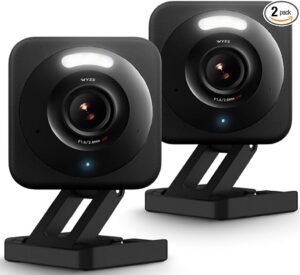 Modern outdoor cameras can offer features such as motionalerts, night vision, wide-angle views, two-way audio, weather-resistant construction, and smartphone notifications.
Some premium cameras use AI-assisted detection to reduce unnecessary alerts. Instead of notifying you every time a tree branch moves, the system may focus on activity that more closely matches the detection categories you’ve selected.
Placement matters just as much as the camera itself.
A camera mounted too high may provide a wide overview but lose useful facial detail. One positioned too low could beeasier to tamper with. You also need to consider lighting, Wi-Fi coverage, and whether nearby objects block the view.
For larger properties, multiple cameras may be necessary to eliminate blind spots.
Best for: Driveways, yards, garages, side entrances, outdoor monitoring
Shop outdoor security cameras on Amazon
3. Indoor Security Cameras
Indoor cameras can be useful when you want to monitor specific areas inside your home.
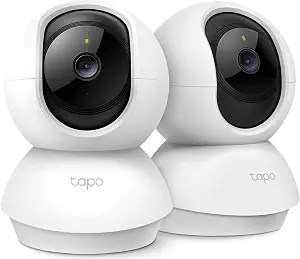
They can help you check whether children have arrived home, monitor pets while you’re away, or keep an eye on a particular room.
Some models include pan-and-tilt functionality, allowing the camera to move and cover a larger area than a fixed camera.
But indoor security cameras require more careful consideration of privacy.
A camera inside your home is fundamentally different from one pointed at your driveway. You should think carefully about where it is placed, who can access recordings, and whether the camera has a physical privacy shutter or another way to disable it.
For rooms where privacy is expected, avoiding cameras altogether may be the better choice.
Security technology should make your home feel safer, not make you uncomfortable inside it.
Best for: Pet monitoring, entry areas, children, selected indoor spaces
Shop indoor security cameras on Amazon
4. Smart Locks
A smart lock replaces or upgrades the locking mechanism on a door and adds electronic access controls.
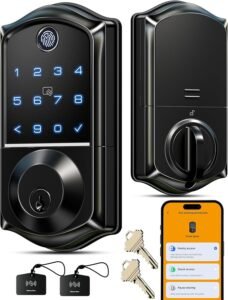
Depending on the model, you may be able to unlock the door using a smartphone, keypad, fingerprint, voice assistant, or traditional key.
One particularly useful feature is temporary access.
Instead of giving someone a physical key that they could potentially keep indefinitely, you can provide a digital access code or permission for a specific period, depending on the lock.
This can be useful for family members, guests, cleaners, contractors, or short-term visitors.
Remote locking can also be convenient. If you’re lying in bed and suddenly wonder whether you locked the front door, you may be able to check and secure it through the app.
However, compatibility is critical. Not every smart lock fits every door, and some require specific door hardware or installation conditions.
Best for: Keyless entry, temporary access, remote locking, households with multiple users
5. Door and Window Sensors
Sometimes the simplest security devices are the most useful.
A smart door or window sensor generally consists of two small components. When the door or window opens, the components separate and the system can trigger an alert.
Unlike a camera, a sensor doesn’t need to capture or interpret video.
It simply answers a basic question:
Is this opening being opened when it shouldn’t be?
That simplicity makes sensors valuable.
You can place them on exterior doors, accessible windows, garage entrances, basement windows, or other potential entry points.
When integrated into a broader smart-home system, sensors can also trigger other actions. For example, opening a door could turn on a light or activate an automation.
They’re relatively inexpensive compared with cameras, which means you can potentially cover more entry points without spending a fortune.
Best for: Doors, windows, garages, basic intrusion detection
Shop smart door and window sensors on Amazon
6. Smart Motion Sensors
Motion sensors add another layer of awareness.
While door sensors tell you that an opening has changed state, motion sensors can detect activity within a particular area.
Place one in a hallway, garage, entryway, or other strategically selected location and it can become part of an automated security system.
Motion sensors can also do more than security.
For example, detecting movement could automatically turn on lights when someone enters a dark hallway.
This is where smart-home technology becomes particularly interesting. The same sensor that contributes to security can also improve everyday convenience.
When shopping, pay attention to detection range, mounting options, battery life, and compatibility with your smart-home platform.
You should also think about pets. Depending on the sensor, household animals can potentially trigger false alerts, so pet-friendly detection may be worth considering.
Best for: Hallways, garages, entryways, automation
Shop smart motion sensors on Amazon
7. Smart Garage Door Controllers
The garage is sometimes overlooked when people think about home security.
That’s a mistake.
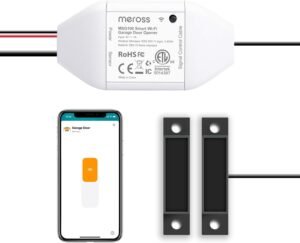
A garage can provide direct or indirect access to your home, and many homeowners don’t always know whether the garage door is closed.
A smart garage door controller can add smartphone monitoring and control to a compatible garage door opener.
Depending on the product, you may receive an alert if the door has been left open or be able to close it remotely.
Imagine driving away from home and suddenly wondering whether you remembered to close the garage.
Instead of turning around, you can potentially check the status through your phone.
Compatibility is particularly important with garage products. Check whether the controller works with your existing opener before purchasing.
Best for: Garages, remote monitoring, homeowners who frequently forget to close the door
Shop smart garage door controllers on Amazon
8. Smart Smoke and Carbon Monoxide Detectors
Home security isn’t only about preventing burglary.
Protecting your household from fire and carbon monoxide is arguably even more important.
Smart smoke and carbon monoxide detectors can send alerts to your smartphone when dangerous conditions are detected.
That connected notification can be valuable when you’re away from home.
A conventional detector may sound an alarm inside the house, but a connected model can potentially notify you remotely depending on its design and connectivity.
Some products can also identify whether the issue is smoke, carbon monoxide, or another condition.
When purchasing these devices, pay close attention to certification, sensor type, replacement requirements, battery life, and local safety regulations.
Smart features are useful, but the fundamental job of the detector is still reliable hazard detection.
Best for: Fire safety, carbon monoxide monitoring, connected home safety
Shop smart smoke and CO detectors on Amazon
9. Smart Water Leak Sensors
Here’s a security device many people don’t think about until it’s too late.
Water damage can become incredibly expensive, particularly when a small leak continues unnoticed for hours.
Smart water leak sensors can detect moisture and send an alert when water is detected.
You can place them near washing machines, water heaters, sinks, dishwashers, basements, or other areas where leaks are possible.
Some advanced systems can work with automatic shutoff valves, allowing a detected leak to trigger a water supply response.
That combination can be especially powerful.
Instead of discovering a leak after returning from vacation, you could potentially receive an alert much earlier.
A security strategy doesn’t always have to involve cameras and alarms. Preventing damage is another important part of protecting a home.
Best for: Basements, kitchens, bathrooms, water heaters, laundry areas
Shop smart water leak sensors on Amazon
10. Smart Home Security Systems
If you want multiple security devices to work together, a complete smart home security system may be the better option.
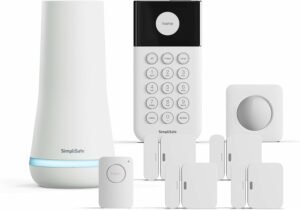
Instead of managing separate products individually, a security system can bring together sensors, cameras, alarms, motion detectors, and other devices under one platform.
This can make management easier.
For example, you could configure a “Home” mode that keeps certain sensors active while disabling others, and an “Away” mode that activates broader monitoring when everyone leaves.
The exact capabilities depend on the ecosystem.
Some systems are designed for DIY installation, while others can involve professional monitoring or installation services.
The important thing is to understand the total cost. Hardware is only part of the equation. Some systems include optional or required monthly subscriptions for cloud storage, professional monitoring, advanced detection, or other services.
Best for: Whole-home protection, multi-device setups, families
Shop smart home security systems on Amazon
The 10 Best Smart Home Security Devices at a Glance
| DeviceBest ForKey Advantage | ||
|---|---|---|
| Smart Video Doorbell | Front door | Visitor and package monitoring |
| Outdoor Security Camera | Outdoor areas | Wider property visibility |
| Indoor Security Camera | Indoor monitoring | Remote awareness of selected rooms |
| Smart Lock | Entry control | Keyless and remote access |
| Door/Window Sensor | Entry points | Simple intrusion alerts |
| Motion Sensor | Activity detection | Detects movement in selected areas |
| Smart Garage Controller | Garage | Remote status and control |
| Smart Smoke/CO Detector | Safety | Connected fire and CO alerts |
| Water Leak Sensor | Water damage prevention | Early leak detection |
| Smart Security System | Whole home | Integrates multiple devices |
How Much Does a Smart Home Security Setup Cost?
You don’t necessarily need to spend thousands of dollars to create a useful security setup.
A basic system can start with a video doorbell and a few door or window sensors. From there, you can gradually add cameras, smart locks, motion sensors, and environmental monitoring.
| Security SetupTypical ComponentsBest For | ||
|---|---|---|
| Basic | Doorbell + sensors | Apartments and small homes |
| Mid-range | Doorbell + cameras + sensors + smart lock | Most families |
| Advanced | Multiple cameras + sensors + alarm + smart locks | Larger properties |
| Comprehensive | Full security ecosystem + monitoring | Maximum convenience and coverage |
Actual prices vary considerably by brand, features, installation, storage options, and subscription plans.
Rather than buying everything at once, identify the most vulnerable areas of your property and build from there.
Which Smart Security Device Should You Buy First?
If you’re starting from scratch, the smart video doorbell is often a logical first purchase because the front entrance is one of the most important areas to monitor.
After that, consider door and window sensors for accessible entry points. They’re relatively affordable and don’t raise the same privacy concerns as indoor cameras.
If you have a driveway, backyard, garage, or side entrance that isn’t visible from the front door, an outdoor security camera can fill that gap.
A smart lock is another strong upgrade if you’re particularly interested in keyless access and remote control.
For families, adding smart smoke and carbon monoxide detectors can provide another important layer of safety.
The goal isn’t to cover every square inch of your property with cameras.
It’s to create sensible coverage without making your home unnecessarily complicated.
Smart Home Security vs Traditional Security
Traditional security systems still have an important place in home protection.
A conventional alarm can be simple, reliable, and independent of many smart-home services. Smart security devices, on the other hand, offer greater connectivity and remote control.
| Feature | Traditional Security | Smart Home Security |
|---|---|---|
| Remote smartphone alerts | Limited | Usually available |
| Video monitoring | Separate equipment | Commonly integrated |
| Remote access control | Limited | Common |
| Home automation | Minimal | Extensive |
| Device integration | Limited | Broad ecosystem support |
| Internet dependency | Lower | Often higher |
The best solution isn’t always one or the other.
Many homeowners can benefit from combining dependable physical security measures with smart technology.
Strong doors and locks, good exterior lighting, secure windows, and sensible habits still matter.
Technology should complement those fundamentals rather than replace them.
Important Smart Home Security Features to Look For
Not every camera or smart lock offers the same level of functionality.
When comparing products, look beyond marketing claims and examine the details.
AI-Powered Detection
AI-based detection can help distinguish people, vehicles, packages, animals, or other movement categories. This can reduce unnecessary notifications.
However, detection accuracy varies, so don’t assume every product will perform identically.
Local Storage
Some security cameras allow recordings to be stored locally rather than exclusively in the cloud.
Local storage can provide more control over your footage and may reduce recurring subscription costs.
Cloud Storage
Cloud recording allows you to access footage remotely and can protect recordings if someone damages or steals the physical camera.
The downside is that cloud storage frequently involves a subscription.
Two-Factor Authentication
If your security devices are connected to an online account, protecting that account is essential.
Two-factor authentication adds another barrier if your password is compromised.
Strong Privacy Controls
Look for features such as privacy shutters, customizable recording zones, encryption, user permissions, and clear data-storage policies.
Don’t Forget the Network Behind Your Security Devices
There’s an important part of smart home security that doesn’t sit on your wall.
It’s your Wi-Fi network.
Your cameras, smart locks, sensors, and other connected devices depend on the network and accounts that support them. If those systems aren’t properly secured, adding more smart devices can increase your digital attack surface.
Start with the basics.
Use a strong, unique Wi-Fi password and keep your router firmware updated. Enable modern wireless security where supported, and consider placing smart-home devices on a separate network or guest/IoT network when your router supports appropriate isolation.
Your security-device accounts should also use unique passwords and multi-factor authentication whenever available.
And keep device firmware updated.
A smart security camera that’s physically excellent but running outdated software isn’t an ideal security solution.
Privacy Matters More Than Ever
Smart cameras are powerful because they can see what’s happening around your property.
That same capability creates privacy responsibilities.
Before installing cameras, consider your neighbors, visitors, shared spaces, and local laws. Avoid unnecessarily recording areas where people have a reasonable expectation of privacy.
You should also understand what happens to recordings after they’re captured.
Ask:
- Where is the video stored?
- How long is it retained?
- Can you delete recordings?
- Who can access the footage?
- Is the data encrypted?
- Does the manufacturer require a subscription?
- Can you disable the camera or microphone?
These aren’t minor questions.
When you install a camera, you’re effectively adding another set of eyes to your home. You should know exactly where those eyes are looking and who can access what they see.
Common Mistakes to Avoid When Building a Smart Security System
One of the biggest mistakes is buying products from too many incompatible ecosystems.
You might end up with one app for cameras, another for locks, another for sensors, and another for your alarm. That can quickly become frustrating.
Another mistake is focusing entirely on camera resolution.
A 4K camera isn’t automatically better for every location. Placement, lighting, field of view, nighttime performance, and reliable connectivity can matter just as much.
It’s also a mistake to rely completely on smartphone notifications.
If your phone is muted, disconnected, or unavailable, an alert may not help much. That’s why audible alarms, physical locks, lighting, and other traditional security measures still matter.
Finally, don’t forget maintenance.
Check batteries, update firmware, review account access, test alarms, and make sure cameras haven’t been accidentally repositioned.
A security system only works well when it’s maintained.
The Best Smart Home Security Setup for Most Homes
For the average homeowner, you don’t need an enormous collection of devices.
A practical setup could include a smart video doorbell, one or two outdoor security cameras, several door and window sensors, a smart lock, and smart smoke and carbon monoxide detectors.
If you have a garage, add a smart garage controller. If your home has a history of water leaks or contains equipment vulnerable to water damage, add leak sensors.
This approach provides multiple layers rather than relying on a single device.
The cameras provide visibility.
The sensors provide detection.
The lock provides access control.
The smoke and water sensors provide environmental protection.
Together, they create a much more complete picture of what’s happening around your home.
Final Thoughts
The best smart home security devices in 2026 aren’t necessarily the products with the longest feature lists.
They’re the ones that provide useful protection without making everyday life unnecessarily complicated.
A video doorbell can help you understand what’s happening at your front door. Outdoor cameras can expand visibility around your property. Smart locks can simplify access, while inexpensive sensors can quietly monitor doors and windows.
Beyond intrusion protection, smart smoke detectors and water leak sensors show how home security is becoming broader. The goal isn’t simply to stop someone from entering your home. It’s also about detecting problems early and giving you enough information to respond.
But technology should never create a false sense of security.
Strong physical locks, good lighting, secure windows, careful online account management, and sensible security habits remain important.
The smartest approach is layered protection.
Start with the areas that matter most, choose compatible devices, secure your accounts, respect privacy, and expand the system only when there’s a genuine reason to do so.
Your home doesn’t need to look like a security control room.
It simply needs to be smarter, more visible, and better prepared.
Frequently Asked Questions
What is the best smart home security device to buy first?
A smart video doorbell is often a good starting point because it provides visibility around one of the home’s most important access points. After that, door and window sensors can provide affordable coverage for additional entry points.
Are smart security cameras worth it?
They can be valuable when positioned correctly and configured securely. Features such as motion detection, night vision, smartphone alerts, and local or cloud recording can provide useful awareness. However, cameras should complement rather than replace physical security measures.
Do smart home security devices require Wi-Fi?
Many connected cameras, locks, and sensors use Wi-Fi or another wireless technology, but requirements vary. Some devices can communicate through dedicated smart-home protocols or hubs. Always check the connectivity requirements of a product before purchasing it.
Are smart locks secure?
A reputable smart lock with strong encryption, secure authentication, regular software updates, and properly configured access controls can be a useful part of a home security system. However, installation quality and the physical strength of the door and lock are also important.
Do smart security cameras require a monthly subscription?
Not all of them do. Some cameras provide local storage without a recurring fee, while others charge for cloud recording, extended video history, AI detection, or other premium features. Check the manufacturer’s current storage and subscription terms before buying.

Pingback: 10 Cool Gadgets You Didn't Know You Needed in 2026 - TECHZ